


One token, many roads
USDT is issued on many blockchains. Think of each blockchain as a separate road network: the parcel is the same, but a truck on the Tron road cannot deliver to a house that only has an Ethereum driveway.
When you withdraw, you choose the road. When someone gives you a deposit address, they are telling you which road their house is on. The network you choose must match the network of the receiving address — every time, without exception.
If you send USDT on a network the receiving platform does not support for that address, the funds may be lost permanently. Some exchanges can recover them for a large fee after weeks of waiting; many cannot recover them at all.
What it actually costs: real withdrawal fees
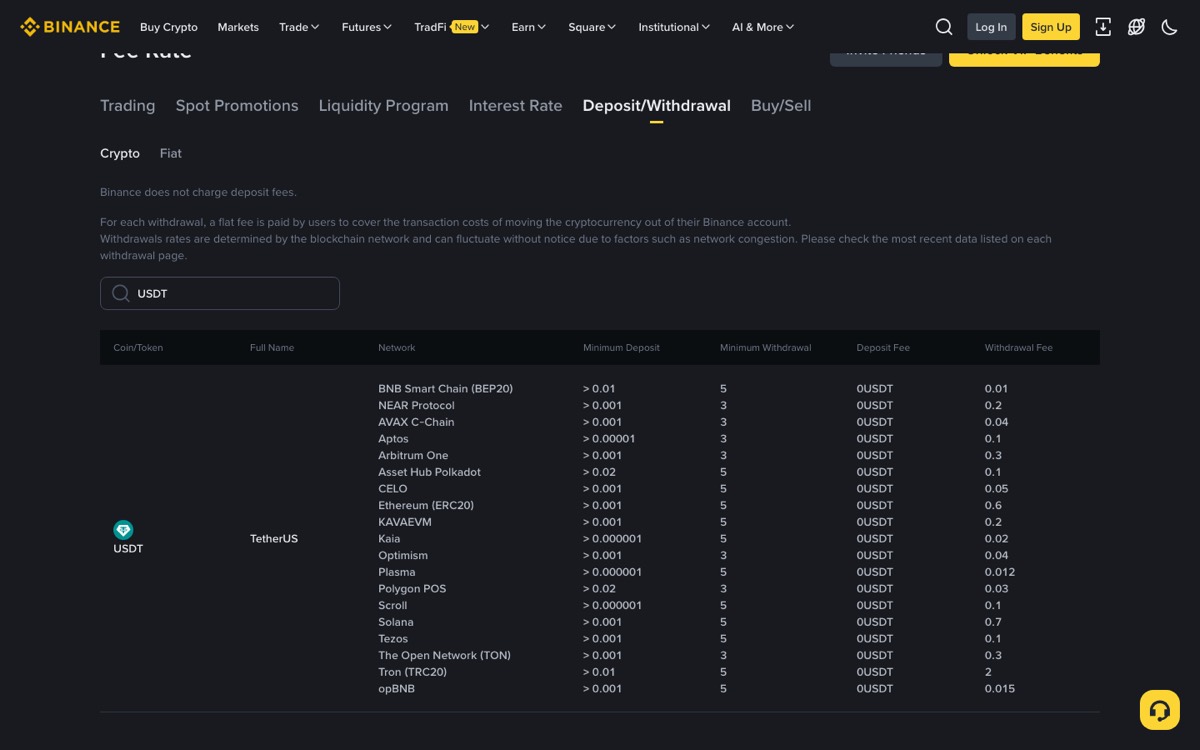
Fees change with network congestion and exchange policy, so always read the number on the withdrawal screen. To give you a sense of the differences, here is what Binance's public fee page listed for USDT on the day we checked: BNB Smart Chain (BEP20) 0.01 USDT, Polygon 0.03, Optimism 0.04, Arbitrum One 0.3, TON 0.3, Ethereum (ERC20) 0.6, Solana 0.7 and Tron (TRC20) 2 USDT.
Two things stand out. First, the cheapest network is not the one many people assume: TRC20 was one of the most expensive options on that day. Second, the differences are large relative to small transfers. Sending 20 USDT on TRC20 would cost 10% of the amount; on BEP20 it would cost almost nothing.
The main networks, in plain language
- TRC20 (Tron): supported by almost every exchange and P2P seller, fast, and the default in many emerging markets. Fees on exchanges have risen; compare before sending.
- BEP20 (BNB Smart Chain): very cheap and fast. Addresses start with 0x, exactly like Ethereum addresses, which causes confusion (see below).
- ERC20 (Ethereum): the original USDT and the most widely supported by wallets and institutions. On-chain fees can be high when Ethereum is busy.
- Arbitrum, Optimism, Polygon: networks built on top of Ethereum with low fees. Supported by major exchanges, but not by every wallet or P2P counterparty.
- Solana: fast and cheap, popular with newer wallets.
- TON: integrated with Telegram wallets. Exchange deposits often require a memo or comment — forget it and your deposit can get stuck.
How to pick the network in practice
- Ask the receiver which network they support, or open the deposit page of the receiving exchange and select USDT.
- Look at the networks the receiving side offers. Choose one that the sending side also offers.
- Among the networks both sides support, choose the cheapest that is not under maintenance.
- Copy the deposit address shown for that exact network. If the receiver shows a memo or tag, copy it too.
- On the sending exchange, select the same network, paste the address and memo, and check the fee and the amount the receiver will get.
The 0x trap: when a valid address is still wrong
Ethereum, BNB Smart Chain, Arbitrum, Optimism and Polygon all use addresses that start with 0x and look identical. The withdrawal form will happily accept a BEP20 address on the ERC20 network, because the format is valid. Whether the funds arrive depends on whether the receiver supports that network at that address.
Exchanges usually show a warning such as "make sure the receiving platform supports this network". Take it seriously. The address being accepted is not proof that the network is right.
The checklist before every withdrawal
- Copy and paste the address; never type it.
- Compare the first four and last four characters after pasting. Some malware replaces copied addresses.
- Confirm the network matches the receiver's deposit page.
- Enter the memo, tag or comment if one is shown.
- For a new address, send a small test amount first and wait until it arrives.
- Keep the transaction ID (TxID). It is the receipt you will need if anything goes wrong.
Add addresses you use often to your withdrawal whitelist. You only verify them once, and nobody who steals your password can add a new destination quickly.
Tracking a transfer
After you withdraw, the exchange shows a TxID. Paste it into the network's explorer — Tronscan for TRC20, BscScan for BEP20, Etherscan for ERC20 — and you can see whether the transfer was confirmed and how many confirmations it has.
If the explorer shows the transfer as successful but the receiving exchange has not credited it, the receiving side usually needs more confirmations or is processing deposits slowly. Wait, then contact their support with the TxID.
What to do if you used the wrong network
- Stop and do not send more funds to test.
- Find the TxID and confirm on the explorer which network the funds went to.
- Contact the receiving platform's support with the TxID, the network used and the address. Ask whether they offer a recovery service.
- If you sent to your own wallet on the wrong network, importing the same seed phrase into a wallet that supports that network often shows the funds.
- Ignore anyone who contacts you offering to "recover" funds for an upfront fee. Recovery scams target exactly this situation.
A worked example
Imagine you want to move 100 USDT from Exchange A to Exchange B. You open Exchange B, choose Deposit, select USDT and see that it accepts TRC20, BEP20, Ethereum, Solana and Arbitrum. You open Exchange A's withdrawal screen and see the same networks, with fees of 2, 0.01, 0.6, 0.7 and 0.3 USDT respectively.
Both sides support BEP20 and it is the cheapest, so you choose BEP20 on Exchange B's deposit page, copy the address that appears, switch to BEP20 on Exchange A, paste the address and check the preview: amount 100, fee 0.01, received 99.99. You confirm with your 2FA code, copy the TxID, and a few minutes later the deposit appears on Exchange B.
Had you chosen TRC20 out of habit, the transfer would have cost 2 USDT instead of one cent — and had you pasted the BEP20 address while TRC20 was selected, the exchange would have rejected it because the address format does not match. Mistakes between the 0x networks are the ones the form cannot catch for you.
Self-custody wallets need gas
If you send USDT from your own wallet instead of an exchange, you pay the network fee directly in that network's native coin: TRX on Tron, BNB on BNB Smart Chain, ETH on Ethereum and Arbitrum, SOL on Solana, TON on TON. A wallet holding only USDT cannot send it. Keep a small amount of the native coin in the wallet for fees.
On Tron, wallets may show "energy" and "bandwidth" instead of a simple fee; if you lack them, the network burns TRX to cover the cost. On Ethereum the fee rises when the network is busy. These details are why many beginners prefer to keep funds on a reputable exchange until they are comfortable with wallets.
Minimums, maintenance and congestion
Each network has a minimum withdrawal on the sending side and sometimes a minimum deposit on the receiving side; amounts below the minimum deposit may never be credited. Exchanges also suspend individual networks for upgrades or congestion, and show a notice on the withdrawal page when they do. If the network you planned to use is suspended, choose another network both sides support rather than waiting with funds in limbo.
When someone asks you to send to them
When a friend, client or seller asks you to send USDT, always ask two questions before anything else: "Which network?" and "Is there a memo or tag?" Get the answer in writing, together with the address, and repeat it back. A short message such as "100 USDT, BEP20, address ending 7f3a, no memo" prevents most mistakes.
If you are the one receiving, send the sender a screenshot of your deposit page that shows the network name clearly next to the address. Many disputes between friends start with "I sent it to your address" and end with the discovery that the address was correct but the network was not.
Be careful with addresses saved in chats. Scammers who gain access to someone's messaging account sometimes edit or resend "updated" deposit addresses. If an address changes unexpectedly, confirm it by voice or in person before sending.
In short
Match the network on both sides, copy and paste the address, check the first and last characters, include any memo, test new addresses with a small amount, and keep the TxID. Those six habits prevent nearly every network mistake beginners make.